


Todoist screenshots (4)

Description Todoist
Stop Letting Tasks Control Your Life—Take Back Your Time
Imagine opening your phone and seeing your entire day, week, and month perfectly mapped out. No more frantic mental checklists, no more forgotten deadlines, and no more that sinking feeling you’ve missed something important. That’s the clarity Todoist delivers from the moment you start. This isn’t just another to-do list; it’s your personal command center for work and life, engineered to turn overwhelming chaos into manageable, actionable steps. Your journey to effortless productivity begins with a single, seamless setup.
After you download Todoist, you’ll be guided to sign in or create your account. This crucial first step unlocks the true power of the app: flawless synchronization. Every task you create instantly appears across your phone, tablet, laptop, and even your smartwatch. Start drafting a project plan on your computer during the day, and check off items from your grocery list on your phone at the store—everything stays perfectly in sync without you lifting a finger. The experience is beautifully ad-free, offering a clean, focused environment where your attention stays on what matters.
A Toolkit Designed for How You Actually Work
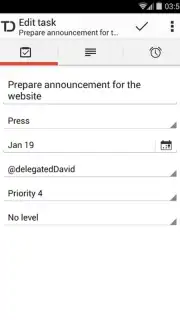
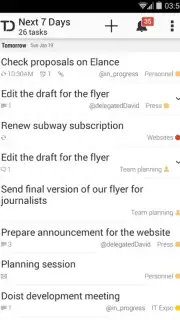
Todoist understands that real-life tasks are complex. That’s why it provides a sophisticated yet intuitive set of organization tools that adapt to your brain, not the other way around. You’ll set due dates with natural language—just type “tomorrow at 3pm” and watch it auto-schedule. You’ll break down monumental projects into subtasks and sub-projects, creating a clear roadmap to completion. Assign priority levels and color-coded labels, and suddenly your entire workload becomes a visual dashboard. A single glance at your screen tells you exactly what to tackle next, transforming anxiety into action.
Collaboration feels magical here. Share entire projects with colleagues, friends, or family with just a few taps. Delegate tasks, leave comments, and watch as progress happens in real-time, with everyone involved able to edit and update. Need to attach relevant files? Todoist’s deep integration with cloud services like Google Drive and Dropbox makes it effortless. Attach a presentation, a PDF, or an image directly to a task in seconds, keeping all context and resources in one searchable place. It’s the seamless bridge between your tasks and the digital tools you already use.
- Universal Synchronization: Log in once and access your perfectly synced task list across every device and platform you own.
- Advanced Task Organization: Master your workload with due dates, recurring schedules, priority flags, subtasks, sub-projects, and customizable color-coding.
- Frictionless Collaboration: Share projects and assign tasks to others, enabling real-time teamwork and streamlined delegation.
- Cloud Storage Integration: Attach files directly from Google Drive and Dropbox to tasks, keeping all relevant documents instantly accessible.
- Ad-Free, Focused Experience: Enjoy a clean, premium interface designed for concentration, free from distracting advertisements.
Stop managing your tasks in scattered notes and overwhelmed thoughts. Todoist provides the structure, intelligence, and simplicity you need to finally feel in control. It’s more than an app; it’s the upgrade your productivity has been waiting for.
Download Todoist now and build your first, perfectly organized day in minutes.
Requires an internet connection for synchronization and certain features. The app may offer optional in-app purchases for premium functionality.
Information
| Version | v12070 |
| Developer | Doist |
| Requirements | Android Android + 8.0+ |
| Updated | 17.03.2026 |
| Size | 59.57 MB |
| Package | com.todoist |
| Signature | 656f27369614b26fea5e872808142584 |
| Architecture | armeabi-v7a, x86, arm64-v8a, x86_64 |


