

Keyboard Swap screenshots (4)

Description Keyboard Swap
A Dedicated Keyboard Manager for Android Precision
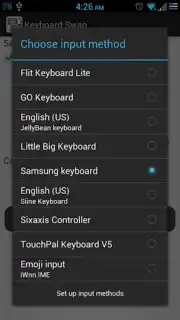
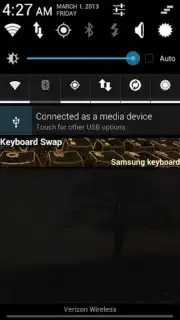
Keyboard Swap delivers a systematic solution for users who operate multiple virtual keyboards across different applications and scenarios. This utility application enables rapid switching between installed keyboard interfaces directly from the notification panel, home screen widget, or the app itself. It is engineered to eliminate the friction of navigating system settings, providing a streamlined layer of control over your text input environment. The tool is designed for functional efficiency, offering a no-frills, ad-free experience that prioritizes immediate access and reliable performance.
Core Operational Features
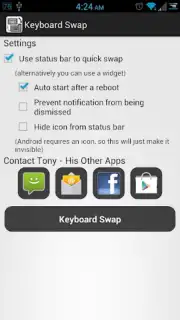
The application functions as a centralized hub for all your keyboard management needs. It installs a persistent notification shade toggle that remains accessible from any screen or application, allowing for instant keyboard swaps without interrupting your workflow. A complementary home screen widget provides an alternative one-tap activation point for switching keyboards. The app’s internal interface lists all compatible keyboards installed on your device, serving as a direct launchpad for selection. Its architecture leverages standard Android permissions for system tools and network communication solely for receiving update notifications via Google Cloud Messaging, ensuring minimal background resource use.
Technical Specifications and User Workflow
Keyboard Swap integrates with the Android input method framework to execute switches. The process requires initial one-time user permission to modify system settings, after which all switching mechanisms become active. The utility does not alter keyboard functionality, themes, or dictionaries; it acts solely as a conduit for activation. Future development paths may include additional widget sizes, visual customization for the selector, and expanded toggle locations, adapting to user feedback and platform updates.
- Instant Notification Toggle: Switch keyboards directly from the pull-down notification panel without leaving your current app.
- Dedicated Home Screen Widget: Place a configurable widget for one-tap keyboard selection from your main desktop.
- Direct In-App Selection List: Launch the app to view and select from all enabled keyboards in a single, clean interface.
- Zero-Advertisement Interface: Experience completely uninterrupted functionality with no banner or video ads.
- Minimal System Footprint: The app requires only essential permissions for operation and update notifications, ensuring efficiency.
Optimize your mobile typing setup and remove the hassle of manual configuration. Download Keyboard Swap now and take direct command of your input methods.
Internet required. IAP available.
Information
| Version | 1.0 |
| Developer | Anthony Jennings |
| Requirements | Android Android + 10.4 Tiger+ |
| Updated | 17.03.2026 |
| Size | 420.03 KB |
| Package | com.thesuxor.android.keyboardswap |
| Signature | fa1dd8e2e9f43eaf2e3b9780169752e8 |


