

Samsung Write on PDF screenshots (3)
Description Samsung Write on PDF
Looking for a streamlined way to annotate and sign documents directly on your Samsung device? Samsung Write on PDF provides a focused, integrated solution for users who need to interact with PDFs without switching between multiple applications. It transforms your device into a direct editing platform, eliminating the dependency on desktop software for basic markups and form completion.
Core Functionality and Toolset
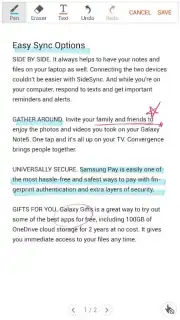
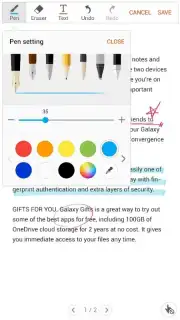
The application operates as a dedicated PDF editor within the Samsung ecosystem. Its primary function is to enable freehand drawing, text insertion, and form field filling directly onto any PDF document stored on your device. This is facilitated through a built-in PDF viewer, which serves as the central workspace for both viewing and editing. The toolset is built around a customizable array of digital brushes and pens. Users can precisely adjust stroke weight, opacity, and color through a clean, contextual toolbar, allowing for clear highlights, precise underlining, or handwritten notes that meet various annotation standards.
A key operational detail involves document permissions. The app requires that a PDF file has the necessary embedded permissions for commenting or form filling to be editable. If these permissions are restricted, the annotation tools will not engage, which is a standard security feature for PDFs rather than a limitation of the app itself. This design ensures compliance with document security protocols while providing full functionality on authorized files.
Detailed Feature Analysis
- Direct PDF Annotation: Draw, write, and highlight directly over PDF content with a range of brush styles and colors.
- Interactive Form Completion: Fill out PDF form fields digitally, enabling quick form signing and submission from your device.
- Fully Customizable Toolset: Adjust pen thickness, color palettes, and opacity for precise and clear document markups.
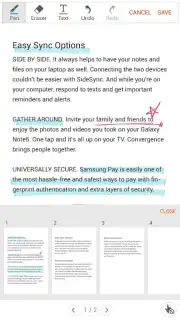
- Integrated PDF Viewer: Open, navigate, and review documents within the app before and after applying annotations.
- Permission-Aware Editing: Securely works with documents that have commenting permissions enabled for professional workflows.
The utility is particularly evident in scenarios requiring quick document turnaround, such as reviewing drafts, signing agreements, or completing administrative forms. The absence of advertisements and the streamlined, device-optimized interface contribute to an uninterrupted workflow, making it a practical tool for business and personal use.
Download Samsung Write on PDF now—this optimized toolset is available for immediate integration into your document management process. Exclusive, seamless functionality for Samsung users.
Internet required. IAP available.
Information
| Version | 2.6.03.9 |
| Developer | Samsung Electronics Co., Ltd. |
| Requirements | Android Android + 8.0+ |
| Updated | 17.03.2026 |
| Size | 17.82 MB |
| Package | com.samsung.android.spdfnote |
| Signature | 04c6f55f211fcd6b329b2f74ec987db9 |
| Architecture | armeabi-v7a |


